

Currently Empty: $0.00
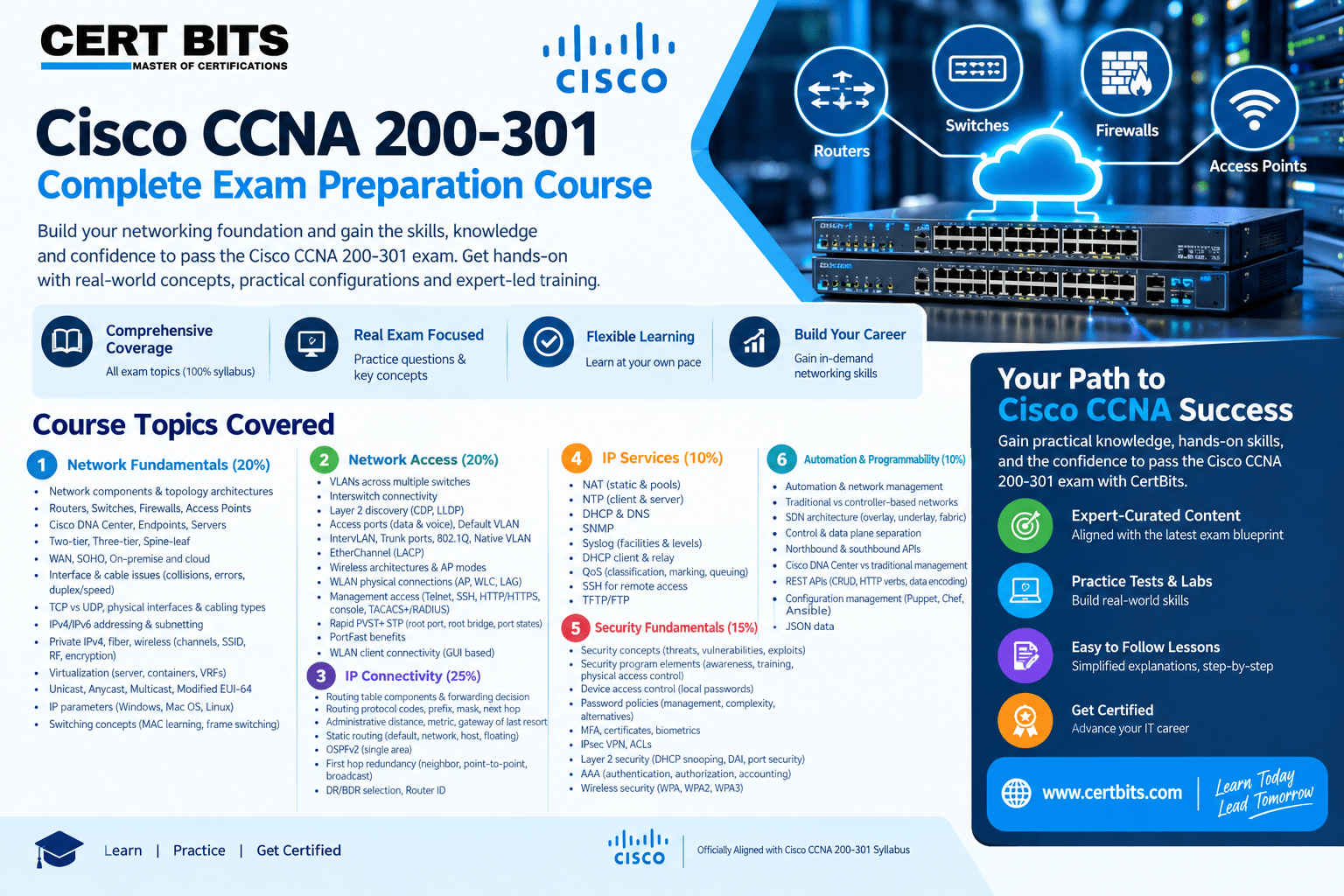
Cisco CCNA 200-301 Training Course
Original price was: $350.00.$200.00Current price is: $200.00.
- Course Duration: 2 Months
- Course Type: Online
Cisco CCNA 200-301 Training Course
Course Overview
Build your networking foundation. Master essential concepts. Prepare with confidence.
The CertBits Cisco CCNA 200-301 Complete Course covers the six major syllabus domains of the CCNA curriculum: Network Fundamentals, Network Access, IP Connectivity, IP Services, Security Fundamentals, and Automation & Programmability.
Course Highlights
- 6 Key Domains covering the complete syllabus
- 100% syllabus coverage based on the supplied CCNA syllabus document
- Networking fundamentals, switching, routing, services, security, and automation
- Configuration and verification topics throughout the syllabus
1.0 Network Fundamentals — 20%
- Explain the role and function of network components: Routers, Switches, Firewall, Access Point, Cisco DNA Center, Endpoint, Server
- Describe characteristics of network topology architectures: Two-tier, Three-tier, Spine-leaf, WAN, Small Office/Home Office (SOHO), On-premise and cloud
- Identify interface and cable issues, including collisions, errors, duplex mismatch, and speed mismatch
- Compare TCP to UDP
- Compare physical interface and cabling types: single-mode fiber, multimode fiber, and copper
- Ethernet shared media and point-to-point connections
- Configure and verify IPv4 addressing and subnetting
- Describe the need for private IPv4 addressing
- Configure and verify IPv6 addressing and prefix
- Describe IPv6 address types: Unicast (global, unique local, and link local), Anycast, Multicast, and Modified EUI-64
- Verify IP parameters for Client OS: Windows, Mac OS, and Linux
- Explain virtualization fundamentals: server virtualization, containers, and VRFs
- Describe wireless principles: nonoverlapping Wi-Fi channels, SSID, RF, and encryption
- Describe switching concepts: MAC learning and aging, frame switching, frame flooding, and MAC address table
2.0 Network Access — 20%
- Configure and verify VLANs (normal range) spanning multiple switches
- Configure and verify interswitch connectivity
- Configure and verify Layer 2 discovery protocols: Cisco Discovery Protocol (CDP) and LLDP
- Access ports (data and voice)
- Default VLAN and InterVLAN connectivity
- Trunk ports, 802.1Q, and Native VLAN
- Configure and verify Layer 2/Layer 3 EtherChannel (LACP)
- Compare Cisco Wireless Architectures and AP modes
- Describe physical infrastructure connections of WLAN components: AP, WLC, access/trunk ports, and LAG
- Describe AP and WLC management access connections: Telnet, SSH, HTTP, HTTPS, console, and TACACS+/RADIUS
- Describe the need for and basic operations of Rapid PVST+ Spanning Tree Protocol
- Identify root port, root bridge (primary/secondary), other port names, forwarding/blocking states, and PortFast benefits
- Configure WLAN client connectivity using GUI-based WLAN creation, security settings, QoS profiles, and advanced WLAN settings
3.0 IP Connectivity — 25%
- Interpret the components of a routing table
- Determine how a router makes a forwarding decision by default
- Routing protocol code, prefix, network mask, next hop, administrative distance, metric, and gateway of last resort
- Longest match, administrative distance, and routing protocol metric
- Configure and verify IPv4 and IPv6 static routing
- Default route, network route, host route, and floating static route
- Configure and verify single-area OSPFv2
- Describe the purpose, functions, and concepts of first-hop redundancy protocols
- Neighbor adjacencies, point-to-point, broadcast (DR/BDR selection), and Router ID
4.0 IP Services — 10%
- Configure and verify inside source NAT using static and pools
- Configure and verify NTP operating in client and server mode
- Explain the role of DHCP and DNS within the network
- Explain the function of SNMP in network operations
- Describe syslog features including facilities and levels
- Configure and verify DHCP client and relay
- Explain forwarding per-hop behavior (PHB) for QoS such as classification, marking, and queuing
- Configure network devices for remote access using SSH
- Describe the capabilities and function of TFTP/FTP in the network
5.0 Security Fundamentals — 15%
- Define key security concepts: threats, vulnerabilities, exploits, and mitigation techniques
- Describe security program elements: user awareness, training, and physical access control
- Configure and verify device access control using local passwords
- Describe security password policy elements such as management, complexity, and password alternatives
- Multifactor authentication, certificates, and biometrics
- Describe IPsec remote access and site-to-site VPNs
- Configure and verify access control lists (ACLs)
- Configure Layer 2 security features: DHCP snooping, dynamic ARP inspection, and port security
- Differentiate authentication, authorization, and accounting concepts
- Describe wireless security protocols: WPA, WPA2, and WPA3
- Configure WLAN using WPA2 PSK using the GUI
6.0 Automation and Programmability — 10%
- Explain how automation impacts network management
- Compare traditional networks with controller-based networking
- Describe controller-based and software-defined architectures: overlay, underlay, and fabric
- Separation of control plane and data plane
- North-bound and south-bound APIs
- Compare traditional campus device management with Cisco DNA Center-enabled device management
- Describe characteristics of REST-based APIs: CRUD, HTTP verbs, and data encoding
- Recognize the capabilities of configuration management mechanisms: Puppet, Chef, and Ansible
- Interpret JSON encoded data